Layer One X is a cryptocurrency that is trying to position itself simultaneously in the spaces of “cryptocurrency”, “software platform for games”, and– as grifters are making popular nowadays– AI.
One of their spotlighted community projects is MAIGA: Make AI Great Again. Its symbol is a big ol’ green hat.
Hoo boy. Not just cryptobros; we’re dealing with MAIGA chuds. Well, at least they secured their shit, right?
…right?

X_wallet, the… everything wallet, I guess? Is Musk gonna sue them for this?
X_wallet is the wallet pushed by the Layer One X folks. It works as a Chrome plugin. Its source code is available online here, and you can download it from the Chrome Web Store– where it has 4.9 stars across 742 ratings (as of writing).
The description is pretty enticing, mentioning that they focus on “Safety above all”:
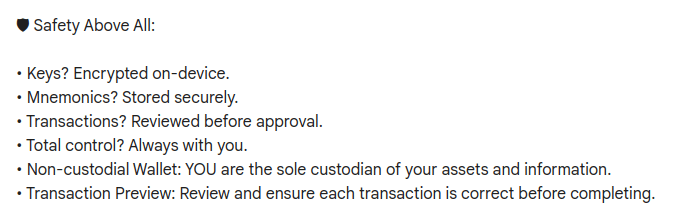
Keys are encrypted on device? That’s good. Mnemonics are stored securely? Hey, not bad! And look– it’s the first wallet developed by the associated L1 blockchain team! Oh, and it supports a whole bunch of cryptocurrencies, not just their own– that’s super useful!
Their Github repo has its own list of nifty features, including… “browser extension”, I guess. Oh, and there’s the bit about how it “provides a 12-word seed phrase for account recovery”.
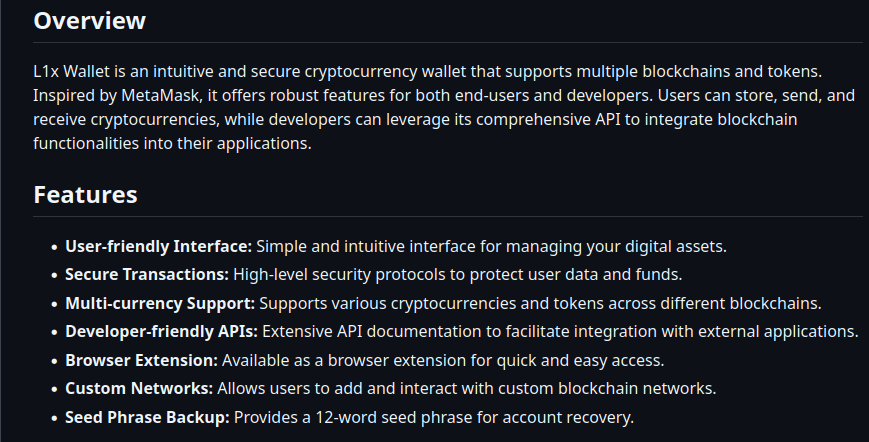
These all seem like pretty good properties that I’m sure will hold up to scrutiny.
Using X_wallet
After you’ve installed this hunk of shit from the Chrome Web Store and accepted the terms of service, you’ll be greeted with a 12-word passphrase that you’ll be asked to save and type back in.
Once you’ve done that, you’ll be asked to provide your email and a password. Then you need to check a box that says, “I understand that XWallet cannot recover this password for me.”
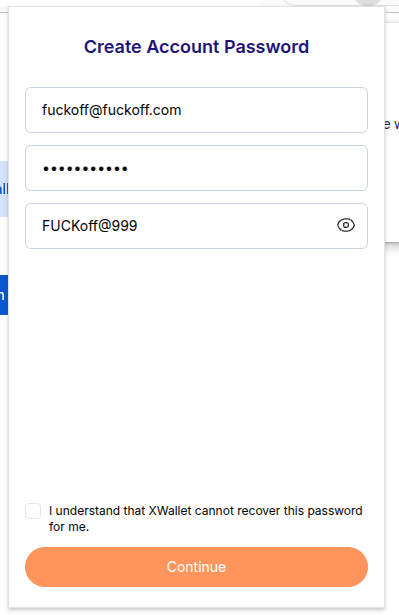
At this point, you’ll be able to do all the standard fancy stuff you would expect of a wallet. You can, uh… send funds, receive funds. Do, like, NFT stuff, I guess? I dunno, put slurps on your layer-one quantum apes or something. Fucked if I know, these crypto people are weird. Anyway, apparently it supports L1X and… Ethereum, I guess? I wasn’t able to get it to create wallets for other cryptocurrencies, so that seems a little weird.
A look inside
Okay, maybe it’s time to start looking into this. The first thing we’re going to look at is how they’re encrypting those private keys they’re storing. How are they turning that utterly-unrecoverable-if-you-lose-it password into protection for all your precious cryptocurrency keys?
Well, only one way to find out– to the source code!
There’s a file in the repo called WalletCrypto.util.ts, which sure as hell seems like a good place to start examining this trainwreck.
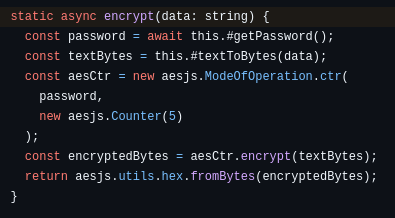
Let’s see what the encryption() function does. So they get the… password?… from the getPassword() method, then use it directly as an AES key. How does that work if the password isn’t the right length? Whatever, we’ll check that in a minute. Meanwhile, it uses AES in CTR mode, generating an IV by… oh, lord, they set it to a constant. Five. Just five. That’s the initialization vector.
That could be a problem. If you’re not familiar, CTR mode (short for “counter” mode) turns AES into a stream cipher, XORing the output against the plaintext. But using the same key with the same IV– say, five— it’s wildly insecure. Unless getPassword() returns different keys for each call, then the encrypt() function is going to encrypt every value it gets by XORing it against a fixed value.
Finally, the encrypted value is converted to a hex string and return.
This is not a great start for our investigation, but maybe getPassword() will save us. Maybe there’s some way that it’s returning different keys each time, based on some weird global state that we’re not aware of– deriving a new key from the password for each call. Seems unlikely, but weirder stuff happens.
Here’s what getPassword() looks like:
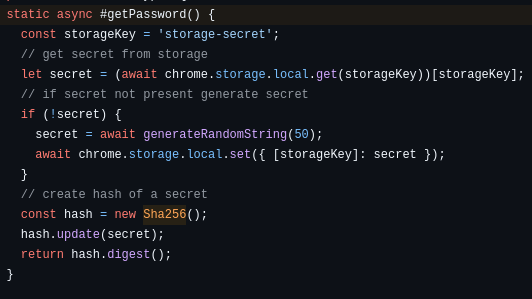
Oh. Oh no. No, this can’t be possible. I don’t fucking believe somebody could be this goddamn stupid. Let’s check the local storage. This has to be a mistake.

When encrypt() calls getPassword(), it’s not using anything the user provides. It’s retrieving value stored in the local key/value database– the same database where they have to store the users’ wallet information, including their private keys— and hashing it to compute the AES storage key. If there’s no value defined there, getPassword() will generate a 50-character random string. Look at it. Look at the “storage-secret” key. It’s right there. In plaintext. Being used to encrypt all the other fucking values in the database.
They’re storing. The encryption key. Next to the encrypted values.
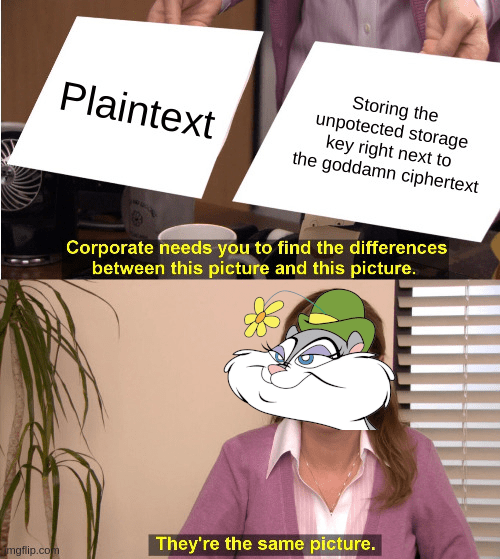
Jesus fucking Christ, what mouth-breathing, beady-eyed, slack-jawed, sister-fucking dipshits wrote this?
Let’s see if it really is as bad as it looks.
We’ll start by computing the SHA256 hash of the storage key:
If it’s as bad as it looks, we should have our key. Let’s try decrypting one of the values. It looks like the Javascript library they’re using has a Python equivalent, so we can use it pretty much the same way. We’ll go ahead and try to decrypt the information stored under the “login” key:
Python 3.13.7 (main, Jan 8 2026, 12:15:45) [GCC 15.2.0] on linux
Type “help”, “copyright”, “credits” or “license” for more information.
>>> import pyaes
>>> key = bytes.fromhex(“8f4f0f6946bb9ef72f203db0c777134745449b9a0418d1b4d9f9abc466768484”)
>>> decryptor = pyaes.AESModeOfOperationCTR(key, pyaes.Counter(5))
>>> ciphertext = bytes.fromhex(“b84aa617c15e4e92194de658d5b31ac5df69ac77dc466a722b677785e310a26bacc157836ba67a17e8876034bd6cfb34ebf812057e4b4e46”)
>>> decryptor.decrypt(ciphertext)
b'{“email”:”fuckoff@fuckoff.com”,”password”:”FUCKoff@999″}’
>>>
Uh-oh. I’m scared to see what happens if we look at the “wallets” key.
Python 3.13.7 (main, Jan  8 2026, 12:15:45) [GCC 15.2.0] on linux
Type "help", "copyright", "credits" or "license" for more information.
>>> import pyaes
>>> key = bytes.fromhex("8f4f0f6946bb9ef72f203db0c777134745449b9a0418d1b4d9f9abc466768484")
>>> decryptor = pyaes.AESModeOfOperationCTR(key, pyaes.Counter(5))
>>> ciphertext = bytes.fromhex("b84a8f4bf81518eb584df05fdfae14d7dc62af7b9d172724352d768fb60aea7ce59411c27ea83c15a88a75428e1ad23fbffa6605214b095d6ac2b30fa275a4\
53cdde0c4ead305ed64902d085c181d569722019273707252a65a7355db662c7cad4d9add23e591019a59628bf8fd5f30daa849878f0f4ff45a9c999e91393523dc527fce6dc131f5aa898c681237a\
4fd14fe6c567d0069bdd34010cf02b4fa6fabbf8b538f04eee1ac85696854e4027390d7cbeb4bda6045da5f1192b8576227eec8e400758ee7ce862d86dda6167d30fa5f2c643d16f1b3784d8fe0c7c\
502c0e82ef1ea9bc17055d2d5886f573a44de7517f04048d965da7ba044bd8eb28d2ad4f6b1c9600d0c86e270ba9a8283ddad36666c9074a223df781afeceb06bcd099fc66469c5f9dc7bfc690b06a\
890a9273d19e04b1e1b41dbe6f3f35fbec41b41cee811b1c7138a0c7982edea600a94917e83205583b12a74f72c422d2cefceb9c2ee5ba37ad921900bb278e0f0ce51bc7fb02da6457d27ca2ae7af5\
ca9e749129e7f7f8ce200304a5ee7e374e932a303c340153493fd0c3f59dd6280def270d143cf74a432bfc005e8ecb15cd4d06c69edde8b511f205959eff47a648ab3e19472803b9b8d90dc9567360\
6c5741080dd83f097ea12725bb60b6664bf4b306f8ecb6a6840aeb91a258ef13a07c1a543ed383ff6e04fc372d131908b481b2ba08115dce3fde9373fee574c575315210516218fbabe37cf642db9e\
c095ef27c835ea16205ed23bf5b42b1469c8247907f8e078cc290e1d1efd410619db5e1d3f30937b47bc87e9eb231acc841bf0")
>>> decryptor.decrypt(ciphertext)
b'{"L1X":[{"privateKey":"0xdbe88d59452ba4fb770f5bd2d49f9efa9f3194dbd33ae458bca7ff14716ee2b5","publicKey":"0x7880841aea82e592eed6f01c5df6d5ba8d56597a","accountName":"Primary Account","type":"L1X","createdAt":1768438549034,"icon":"/assets/L1X_icon-BGMxVBYF.png","createdFromSeed":true}],"EVM":[],"NON-EVM":[],"ACTIVE":{"privateKey":"0xdbe88d59452ba4fb770f5bd2d49f9efa9f3194dbd33ae458bca7ff14716ee2b5","publicKey":"0x7880841aea82e592eed6f01c5df6d5ba8d56597a","accountName":"Primary Account","type":"L1X","createdAt":1768438549034,"icon":"/assets/L1X_icon-BGMxVBYF.png","createdFromSeed":true}}'
>>>
Care to guess what happens when we decrypt the “mnemonic” field? You guessed it, we get back the “account recovery” mnemonic, which feels kinda pointless, given that you– and anybody else with access to your computer— can recover your keys without the goddamn thing.
But wait– what about password you entered at the beginning? That password isn’t used to protect anything in any sense that matters. It’s just an app password that makes their pathetic little charade look a little more secure. They literally check your password by decrypting the login information with the same unprotected key used to protect all your money. These assholes ask you to acknowledge that they can’t help you recover your password, but there’s good news– you can decrypt it for yourself near-instantly!
(Oh, and since that password is stored instead of hashed, I hope you’re not using it anywhere else. Anybody who can get access to your Chrome profile can get recover the password and try it on any websites they think you visit. Nifty!)
This is fucking crazy. Nuttier than squirrel shit after I get into the cashews. This isn’t secure, it’s a combination lock with the combo scrawled in sharpie across the front! Worse than that, this bizarre pile of security theater NONSENSE is the official wallet of the Layer One X cryptocurrency! People actually trust their currency to these blithering shitbiscuits?
If you’re using X_wallet, you need to move your assets Right. Fucking. Now. to a wallet that isn’t a steaming pile of dogshit.
 Salty Squirrel's Security Screwups!